In the market for an easy to refill inkjet printer? Here is my recommendation:
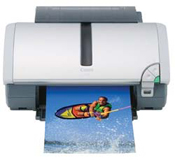
Long story short: Get the Canon i560 or Canon i860 inkjet printer. (NOTE: up-to-date info at bottom of page)
I’ve had years of experience refilling inkjet printers. My very first experience refilling was with the HP 500c and let’s just say it wasn’t my best experience ever. I had almost given up on refilling and had almost given myself to a life void of color until I got my Canon BJC-1000! Not only was it easy to refill, but I refilled my cartridges about 20 times each! Only problems were:
- I had to swap out the black cartridge if I wanted color, and
- the resolution wasn’t very high.
My next printer was a Lexmark Z32. I actually ended up with a few of these printers and about 60 half empty cartridges (returns from a QVC printer sale & returns). I refilled the cartridges, tested them and sold them on eBay. It was a bunch of fun. Everything seemed fine until I started to notice that the color cartridges kept on having problems. At first it was more clogged inkjet head nozzles than usual, but that was usually fixable. The bigger problem was when all of a sudden the printer would stop and I’d get double blinking lights which turned out to mean that the copper contacts on the cartridge were bad. There was nothing to do now but toss out the cartridge. I dealt with these issues for about a year and then thought “There’s got to be a better way!?”
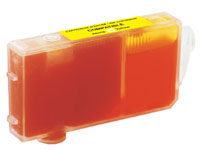
I started my trip of extensive research. My goal: to find the easiest to refill inkjet printer. One that was durable with a very high success rate of refills. Print quality was my second objective. First I called about 5 of the retail inkjet refill franchises to ask them what cartridges they had the best success with. I figured they would know better than anyone. The answer was Canon #1 and then HP. Specifically I was told that the BCI-6 and BCI-3 cartridge series were best because:
- Individual ink tanks
- clear ink tanks (so I can see how much ink is really left).
I scoured the web looking for recommendations, I didn’t find much, but what I did find were a couple very specific recommendations from refillers: the Canon i860. My next mission was to learn more of this printer. I discovered the i560 is the little brother of the i860 but pretty much the same. The 860 has one extra ink color, the BCI-6bk which is a DYE based black for better image resolution since the pigment black BCI-3e doesn’t mix with the dye based inks in a photo. In the 560 the three colors mix to make black. (Click here for The Difference Between Canon BCI-3 and BCI-6) Well, I’m AMAZED at how well this printer prints! The pictures I printed on the Canon 4×6 paper came out just as good as the ones printed professionally. I actually took my print and another of the same picture printed at Sam’s club and showed them to people… they couldn’t tell which was which! Crazzy! I’ve refilled my cartridges a few times already and boy is it easy. The only “problem” is sealing the hole after you’ve injected the ink. I’m using sticky-tac right now, but am getting a new refill kit in a few days with better tools / seals. For the non-refillers this is still a great printer! You can get off-brand non-OEM cartridges for way less than the Canon ones. My brother got some off brand ink tanks for his i860 and I went to his house to run some controlled experiments. We took a very high resolution image from his company logo (Ug from http://www.homevestors.com/ ) and printed it on a glossy sheet of paper. One picture with the OEM inks (that came with the printer) and one from the off brand ink cartridges When we were done I couldn’t tell the difference between the two prints. Be cautious, not all inks are made the same. I’ve heard horror stories of terrible inks. Make sure your supplier of ink and cartridges uses high quality inks so you don’t gum up your printer.
BOTTOM LINE: The i560 / i860 are GREAT printers! They are fast, sharp, have individual ink tanks, cheap ink cartridges, and are easy to refill.
UPDATE 10/4/04: I’ve been refilling this printer a lot and here is what I’ve noticed:
- This really is the easiest cartridge to refill!
- It is still a little tricky to seal the cartridge after drilling a hole and refilling. Everything I’ve tried is either too permanent, or doesn’t make an air tight seal, or leaves a sticky residue (electrical tape, sticky tak, etc.).
- The aftermarket cartridges I purchased have a plug in the refill hole that is replaceable and make re-sealing the cartridge easier.
The aftermarket ink I’ve tried so far works great in photos and with black prints, or color prints. Unfortunately I run into a problem when I am printing the pigmented black (BCI-3) right next to a dye based color… especially yellow. This causes a lot of bleeding from the black into the color. The only way to solve this is to set the printer to print on “photo paper mode” even when printing on regular stock. This causes the printer to change from bi-directional printing to single directional printing which allows the ink time to dry and solves the bleed problem. The only concern is that 1) it takes longer to print and 2) there are twice as many passes for the printhead to take causing more wear and tear on the mechanics of the printer. I’ve been in touch with the ink supplier who is sending me some other inks to try.
UPDATE 3/20/07: I received an email today saying, “Hey Rob, Isn’t it about time to update the “Best Printer for Refilling” page. The i560 and i860 have long been unobatinium or have to risk buying a used printer that is several generations old off eBay, etc. The iP3000 and iP4000 are at least as good as the 560/860, but they may as well be unobtainium as well if you’ve seen the prices they go for on ebay (they have long been out of production – now two generations old). I suggest you look at the iP4300. Granted you have to put up with the chip transplanting, but at least they are available at a reasonable price ($80. after MIR this week at Staples), you can refill the ink tanks just as easily as the predecessor (or buy 3rd party tanks) and the output looks just as good.”My reply, “Excellent points! Since opening up the inkjet printer forum, www.nifty-stuff.com/forum , I’ve relied heavily on people getting their recent information about new printers from the members in the community. You are correct, I should update my page. I agree that the ip3000 / 4000 and even the MP models are great printers, but I’m not yet at the point to recommend the chipped versions.”
UPDATE 11/04/07: I never posted two updates but thought I would now. 1) I was at Fry’s Electronics about 2.5 years ago and they had a bunch of i560’s on sale for $39 each. The cartridges alone were worth that much so I had to buy 4 of these. I sold a few of the carts on eBay and sold 2 the printers (with aftermarket / non-oem cartridges) at a garage sale. Unfortunately I can’t pull together the strength to sell the last two printers. They are really old models now but the i560 is a great workhorse and so easy to refill. 2) I saw a Fry’s Electronics add about 2 years ago which had the MP750 (scanner, copy, printer) for a fantastic price. I was due for a new scanner and even though I always swore to never buy a multipurpose machine I couldn’t pass it up. I noticed that this printer takes the exact same printhead as my i860 so I simply left the new head in the foil and moved the head from my i860 over to my mp750. Now I’ve got a new printhead if I ever need it. I’ve been VERY happy with this multipurpose machine. The only problem I’ve had is that sometimes when it copies / scans I only get a full page of gray. I have to reset the printer and sometimes it works, sometimes it doesn’t.
UPDATE 9/13/09: Well, a few weeks ago my Canon MP 750 returned a “wrong cartridge error”. After a bunch of attempts to get the printer working again I decided this was a sign to do something I’ve wanted to do for a while. Long story short I swapped out my Canon MP750 all-in-one and my Brother HL2170 Laser with a Brother MFC-7440N all-in-one and one of the Canon i560’s I’ve been storing for years. The whole story can be found here: www.nifty-stuff.com/forum/viewtopic.php?id=4225
This article is pretty old and a LOT has chanced over the years regarding printer technology and availability. If you want the latest info check out our printer forum!
I have a canon pixma ip4200 that is two years old and i have been refilling the cli-8y,cli8m,cli8c,clibk,and pgi5bk cartridges from the time that i bought it and have also arrived at the conclusion that canon is the easiest and most successful cartridge to refill.The chip that monitors the ink level is easily bypassed and for problem of sealing the refill hole i use a small screw that creates its own threads and makes for really tight seal with no leakage.I have been refilling cartridges for years and have tried several printer brands such as epson,hp,lexmark,and canon.The worst brand to work with in my opinion is the epson. I have had very little success with epson. So if you plan on refilling your ink cartridges and saving lots of money on ink the canon brand is by far the best choice.
There has been a lot of discussion on the forum (www.nifty-stuff.com/forum) regarding the new line of canon printers and their refillability with the new cartridge chips. Glade to see that you’re having great success even with these chips in place!
I have the answer for you as far as sealing the cartridges. The glue gun. I works awsome. It will make your life easier. I also have the ip4200 and have refilled many times. You have to make sure that you are not putting to much glue in the hole. Then when it comes time to refill, I just use a screw to reopen the hole and bam I am back in the Saddle again. I still wish there was a better way. But I am going to have my pics done by someone else, well, at least the majority. I never cared about the chips. I void the warrantee. Who cares, it cost more to buy new cartridges then a new printer.
Do you have any recommendations on vendors to buy remanufactured inks from? Do they use quality inks or gummy ones? Is there a way we can tell when we first install the cartrigde?
I would have to agree. My ip4000 is going great and my neighbor gave me his i560 that I use for draft printing now. Just wondering when the heads will go … hopefully not for a long time still … any testimonials?
I am using little rubber plugs (sometimes green or white) and they work great for sealing too … the hardest part is just getting that little ball out at the beginning.
I would have to recommend atlanticinkjet.com for ink.
I was interested that the canon s800 or s900 were not mentioned. I have been using the s800 for years and have had 3 of them. The cartridge is easy to fill and I have bought ink and special plugs made by Computer Friends.
Each cartridge takes about 10mm of ink. The printers are designed to print 30,000 sheets, and I doubt that most non business usage does not do that so there are a lot of good machines that come up for sale frequently.
Hi, great information here.
I was wondering if there are updates for newer models which I can buy from the markets. What about the HP and Canon models with multi-functions ? Ease of refilling ink and reliability are my priority than image quality, etc. My budget is about US$150 to 250.
Thanks for the tips.
Hi
As an altrnative some brother multifunction printers seem OK. I have a DCP-120C (now obsolete) which takes translucent cartridges with no foam in and no chip.
To my mind the no-foam issue is worth considering, I used to have a Cannon with foam filled cartridges which were annoyingly slow to fill and you never knew if you had fully filled them or not. It looks like the cannon ones on this page are partially filled with foam so nearly as kgood in this respect.
As far as I can see no current Brother printers take exactly the same cartridges as mine (LC900). But maybe the LC980 and LC1100 hav ethe sames refillable attributes, anyone know?
BTW my cannon printer also had a limit on the total number of sheets it woudl print before “servicing” the price of which would of course have exceeded a new printer.
Best Wishes to all
I just tried to convert my Canon Pixma 4500 to CISS and it was a disaster. Even after we switched the chips, it wouldn’t work. I just came up with an error messge and had no option to continue printing or reset the chips. I can’t recommend it to anyone.
Then I tried to salvage the ink by refilling the cartridges. Of course, I had no directions. Googling it: some say leave the air holes open, some say you must cmpletely seal them.
I ended up drenching the printer with ink. Not sure it can be salvaged. Don’t do this unless you have help or know what you are doing. It’s not for the weak at heart.
I would gladly pay three time the cost for a printer, if it can be easily refilled. I hate being blackmailed by the printer manufacturers with their outrageously priced ink cartridges. Per unit volume, ink is more expensive than gold. $60 for 9 ml of ink is robbery.
If the cartridges cost more than the printer, I toss the printer in the trash.
Some printers are easy to refill. Others have a chip, with an IDPROM on it that flags the cartridge as empty, even if you reset the cartridge and refill it. Epson is notorious for this. I will never buy an Epson printer because of this “attempt” at extorting my money like this.
Anyone know of a hacked driver for a Lexmark 2530? By hacked, I mean with the Lexmark malware removed and no additional malware added.
Last Cannon I had, was like the one you described. However, it had a “resister” in the print head that burned out a little bit each print. Effectively a page counter. After the second head quit on me I trashed the printer. No fade out as in worn out. It just decided to quit. Thus I won’t buy another Cannon. I also don’t trust Lexmark either now. I had an older one that was easy to refill, but my current one, is specifically designed to prevent me from refilling or using alternative carts. So I won’t buy another Lexmark either.
I haven’t heard anything bad about Brothers. Any one had any refilling troubles with them. Do they have chips in carts?
brothers are the best for refilling as thay have no chips and just arsk you if its new or old when you put them back in ive been useing them and refilling them for 3 years now with no probs at all hopes this helps.
The best all in one printer to refill by far was the HP D135 , separate heads and the cartridges can be refilled using a syringe while still left in the printer. The printer has a low ink overide shut off as well. My page counter reads 35,000. And I probably have spent no more than $500 in bulk ink. and $400 for ink head replacements. The vast majority of the pages printed were photos due to my work. I’m still using it today, VERY HAPPY!
I’ve been refilling Brother MFC-210C ink cartridges for about 5 years. I had to drill a hole in the cartridge to be refilled. For the past year or so I’ve been sealing the hole with a small piece of painter’s blue tape. It holds very well. I refill a cartridge about 10 times and the buy a new one. The printer has been discontinued, but the cartridge seems to be pretty available at Staples and Fry’s. All the printer’s listed on the carton are discontinued, so my luck may run sometime in the future.
Use a hot glue gun to seal the hole. It seals it air tight and pops off easy with a knife or small screwdriver.
i’m looking for an all-in-one wireless printer that will network with windows7 and xp pro that has low refillable color and black/white ink cost. I need to scan legal sized docs into pdf as well as print/store from the net or flash drive. I need an auto document feeder and flatbed scanner in addition to good print speed, high resolution , good color and durability all for under $300. i heard cannon was slow and paper trays were small. also would like good aftermarket service. any suggestions?
Hi All,
Anybody interested in refillable ink systems should try YouTube and search the name of their printer, there are usually a few fantastic videos which teach you how to install CISS systems and might prevent you making the simple mistakes which can turn this process into a knightmare.
the best thing for sealing up the holes is monster brand tape.
Manat Moon:
I wholly recommend the Brother multi-function printers that use either the LC-51 or LC-61 cartridges. You can’t refill them yourself, but I get G&G cartridges from EforCity (www.eforcity.com) two of each color (eight total, the printers contain one black and one each of red, blue and yellow) for less than $25 shipped, each cartridge does about 500 pages. At $3 a cartridge, I can afford to swallow the one in ten or one in twelve that are only partially filled (EforCity’s return policy is only 30 days and I usually stock up 16 carts at a time, enough to last about six months) Even the bum carts usually print 150 pages or so — so I can accept those terms at $3 or less a cart. The G&G ink produces high-quality pictures and manuscripts just like the brand inks do.
One caveat: Do not use the fast mode. No matter what ink you use, the heads will clog within 40 pages or so and the print is barely readable. Use fast normal (which is a bit slower to print) to prevent this, the heads almost never clog using that setting.
Also, one warning about HP: Ink (even refilled carts) costs about five times or more the Brother’s price as the cartridges contain the print heads, which are harder to manufacture and therefore drive up the price. EforCity charged about $18 for a 500 page cart for my Deskjet D1520 when they sold them (they no longer do). Printronic charges the same price and have the same problems. Because of the expense, I limit use of this printer and only use it for envelopes and postage stamps (the Brother is not designed for that use, unfortunately). Almost all HPs are built the same way, so steer clear of them. Usually the reman carts for this printer also give more trouble as well, they clog up or quit working at 100-150 pages no matter where I buy them. I think HP has a system to tell if a cart is OEM and if it isn’t, the printer slowly self-destructs the cart a little each print job.
After all, what is the best cartridge to be refilled? I am interested in the life of the cartridge.
I’ve just bought a HP that uses cartridges HP61..and after 50 pages the ink was over. I refiled it and after 20 more pages the cartridge was not usable anymore- AT ALL.
I need to buy a printer with a type of cartridge that lasts long after refilled.
thank you
Ariel
Best way to refill and resealed the Canon catridges: On top of the catridge, there is a hole under the label cover close to the front, any small tip tool poke around. Cut the label coverring the hole (optional). Take a small screw (usual supply with refill ink kit). Inside the hole, there is a small plastic ball covering the hole. Just take the small thumb screw and screw into the ball several turns. Pull the ball out. Fill in new ink. Push the ball back, remove the screw and you are done. Don’t even have to take catridge out of the printer at all. Next time refill is even quicker.
Time again for an update. We just got a i550 from a friend with lots of carts. Unfortunately, after just a month, it now has seemingly died. When you turn it on the status light just flashes green – yellow -green yellow for a total of about 9 times, then starts over. Also, the cartridge carrier does not come to the middle when you open the cover. So we’re looking for a somewhat recent model that is easy to refill. Any suggestions?
Something to consider when buying a new printer. I have a Canon PIXMA Pro9000 Mark II. Not only does this printer have see through cartridges that are easy to refill, but the entire printhead that the cartridges fit into can be removed and washed of ink in the kitchen sink. Needless to say, you must be extremely careful not to touch the contacts or the jet assembly. After washing and a thorough drying the printhead is like new.
Thoroughly disgusted with my HP, only a few months old. Refilling and the results are a nightmare. It’s going out to the curb. Last contribution to this forum was on June 24 of this year. What’s the latest word on printers featuring cartridges which are easily refillable ? Is Canon still the way to go ?? Would prefer a current model rather than going the ebay route.. Should I consider any makes other than Canon ?. Thanks.
RE: Canon Pixma Pro9000 Mark II, are the Canon all in one models just as easy to refill the carts? Please hurry response, as I want to purchase ASAP. Thank you for all your help!
Can you give me any advice for a refill friendly inkjet printer. I would like to be updated because we will be buying a new printer for our publishing firm. What brand and model would you recommend us, that may be refilled by us personally for us not be having a hard time to go in a ink refilling store. ?
I have a Canon MP560 I bought refurb, minus printhead, and installed the old printhead from another now defunct MP560. Worked about 9 months ok. But now, the magenta doesn’t print after many times trying to clean the head, even with a sonic bath. Magenta completely absent although other colors ok. I figure something electronic has burned out for magenta?
#2 — I’ve been a long time fan of Canon AIO for refillability. But now I’m down on them. Just bought a Brother MFC-J430W, and love it far better than the Canon, for refillability. Picture quality seems better also, without the endless trying ot adjust color settings — although I don’t like that it doesn’t allow you to do so very much if ever need to. Also reading about a dozen + 1 methods for refilling out of a dozen contributors. Any comments?
Thank you.
Bob
We have to replace our 4in 1 HP OfficeJet again. This time the printer slowed down to 1 page 5-10 minutes. Everything else works fine, but now the we have to get rid of the equipment. In looking for another we are looking for one that the printer cartridge is easiest to fill. Whether to buy just a printer or go for the 4 in 1 again. Any comments.
Do you recommend a refill friendly all in one printer for under $200.
Thank you!