Refill BCI-3/6/CLI-8 PGI-5Bk cartridges using the “German Durchstich” method
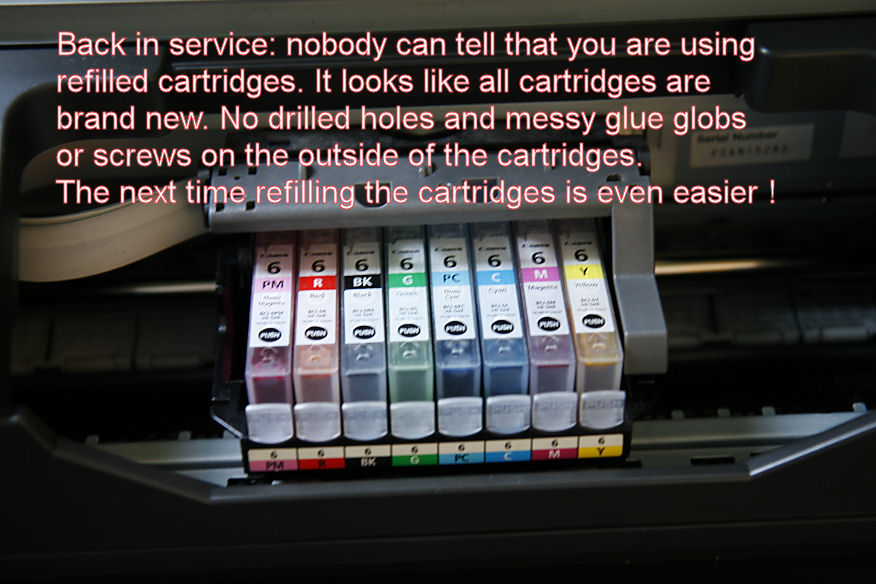
This is a refill method suggested by one of our forum members: pharmacist. I’ve tested this method and have been very happy with it (see updates in the comments).
NOTE: This method is designed for refilling Canon OEM Canon cartridges.
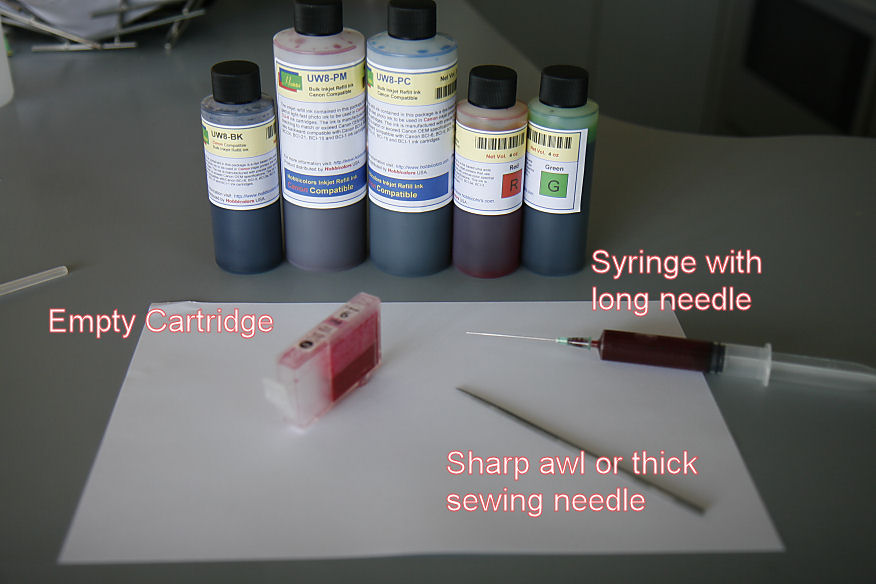
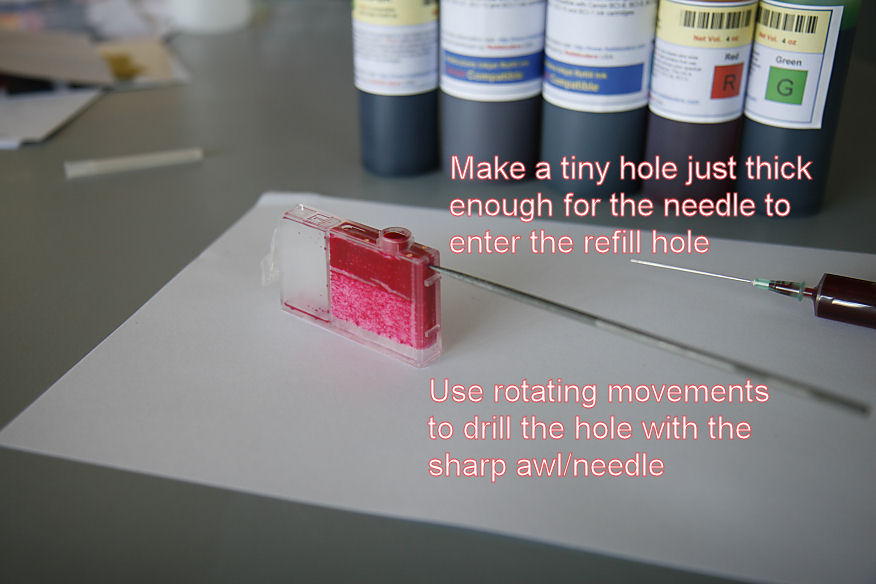
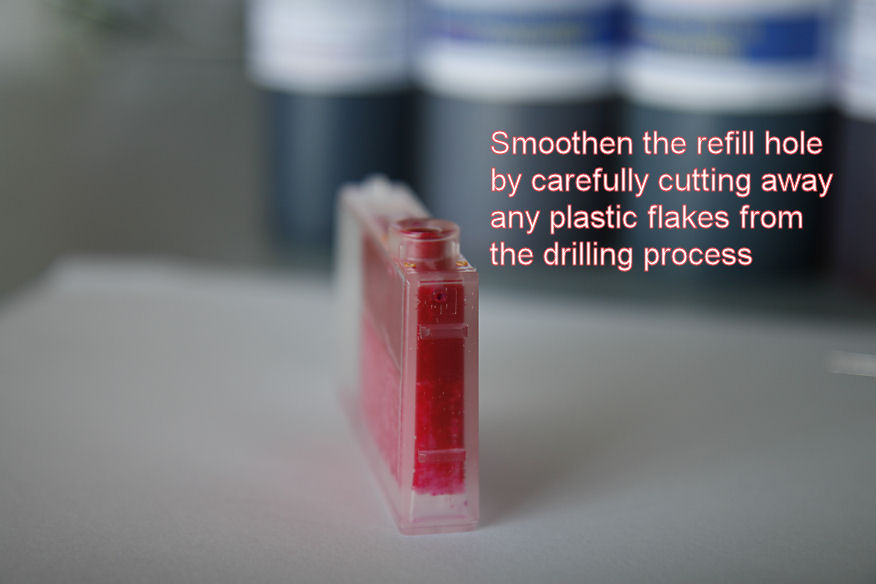
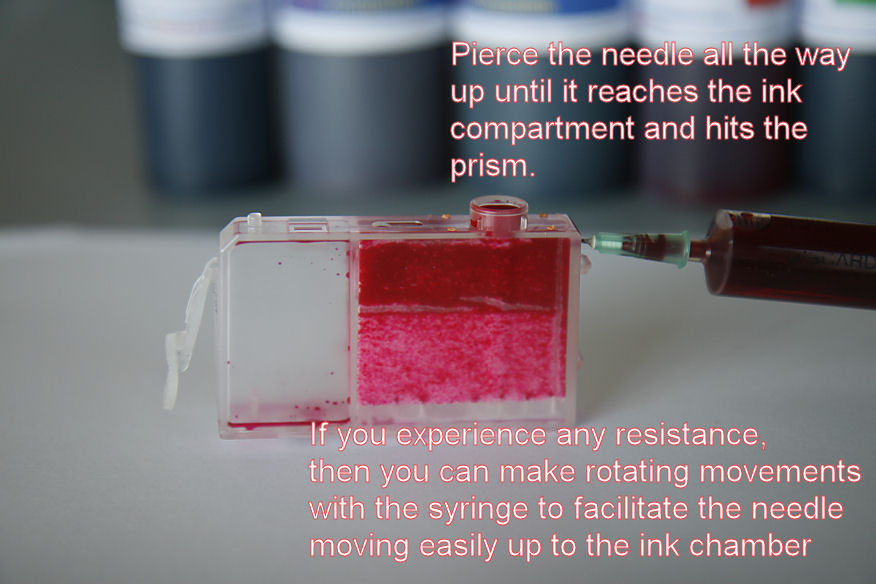
Below are pharmacist’s comments and images regarding this method:
“It really works great and I already refilled my PM cartridge for the 6th time now (the cartridge you are seeing on the pictures I made). So far: not a single drop of ink is coming out of the refill hole (maybe some staining on the plastic back of the printhead, but this is negligible). I have to say: this method is only thoroughly tested on original Canon carts (BCI-6/CLI-8).
The first time I did this I was amazed that not a single ink is coming out (I was afraid too like you !) of the refill ink: but I was concluding if ink would come out of this hole then it would be also from the ink outlet beneath it, and we all know -with sealed carts- it won’t. But I cannot guarantee it will work with aftermarket carts. I do not experience with air leaking at all when printing sudden large area’s with the same colour whatsoever. It works great with original Canon carts.”
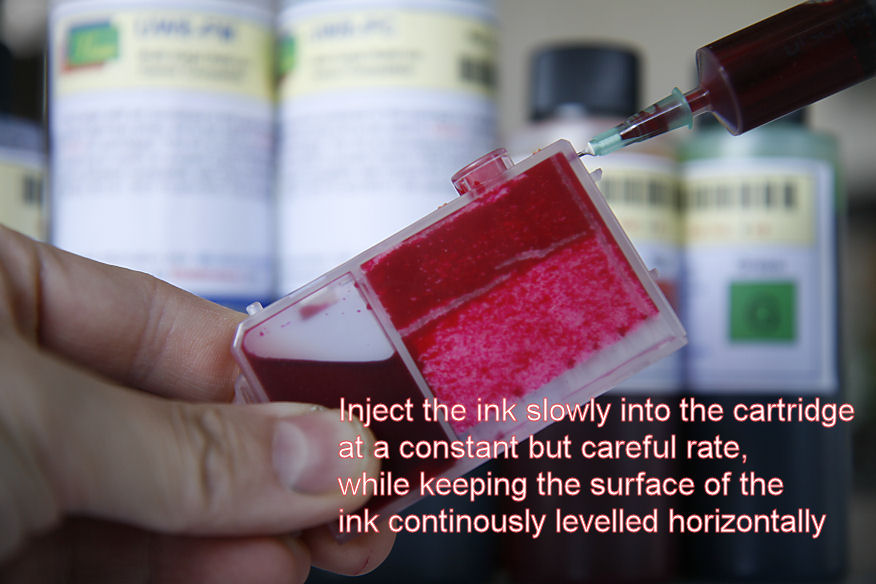
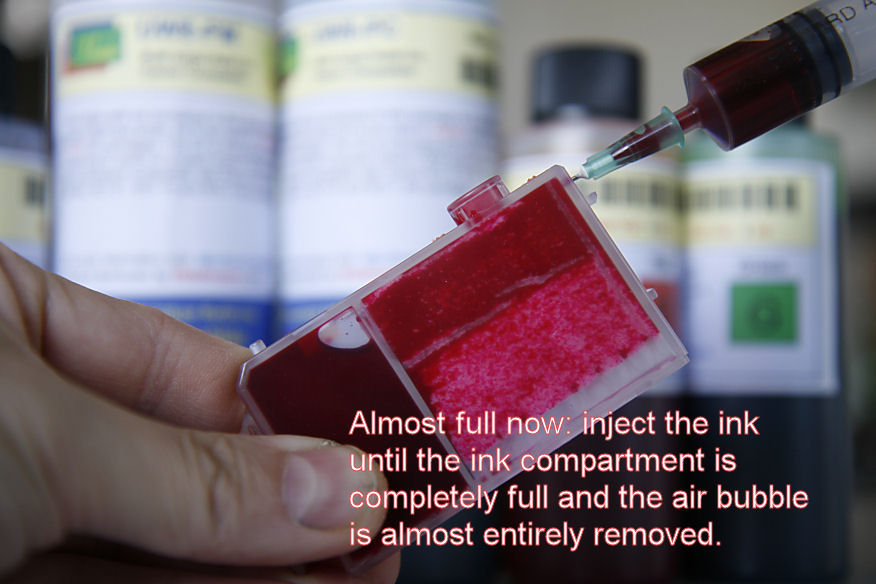
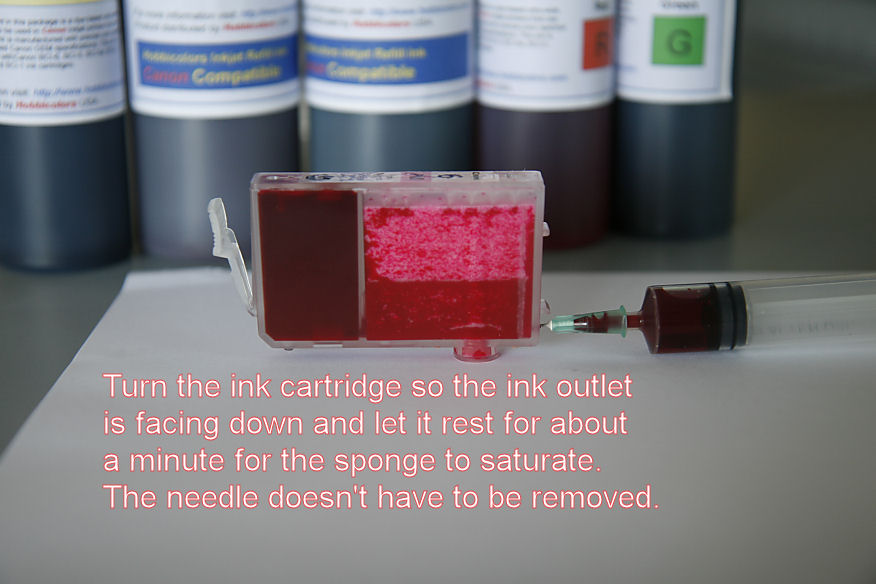
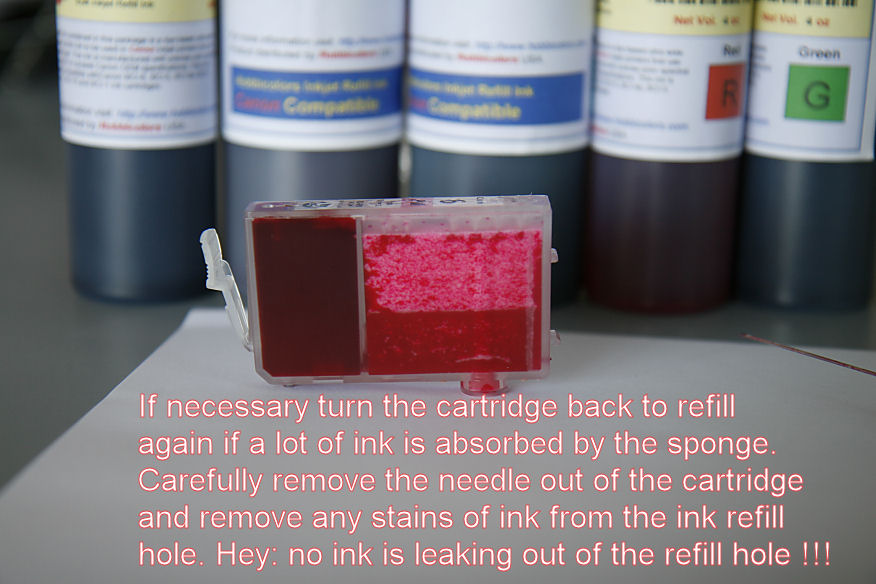
Here’s a fantastic video from our forum member ghwellsjr
Update From Rob 10/24/2010: I just refilled all my carts with the “German Method” and I’m super pleased with how well it works. Ive been refilling carts for over 10 years and this is by far the easiest and most reliable process (Canon OEM cartridges & the German refill method) that I’ve ever used. It has proven to be faster, easier, less messy, and I have less nozzle problems. I only wish I had known about and used this process sooner!
View larger versions of the images and discuss this method on our forum here.
Can you explain why ink is not leaking out via the drilled hole ?
Just ask yourself: the exit hole beneath the cartridge is larger and lower than than the refill hole. The resistance is less in the ink exit hole compared to the refill hole (much larger area) and the pressure is greater there because the exit hole is on a lower base. The ink should pushing more on the exit hole than on the refill hole. You should ask yourself why no ink is leaking from the ink exit hole…..
You know the trick with a drinking straw with you finger pressed over the opening and when you lift the straw from a glass of lemonade, you can see that the liquid surface is rising according with the hight of your finger. Remove your finger and the lemonade will fall back into the glass. In short: it has to do with basic physics. That’s the reason why a Canon cartridge will leak when you make a hole above the ink compartment…….
The CLI-8 series (t.ex Pixma printers) have nowadays a built-in chip to track ink usage. Refilling through holes drilled on rear side wall works fine for few refills if you tape back the holes and of course, clicking “yes” to the dialogue window where Canon does not take responsability for your refill actions.
After some refills, the printer starts to behave pretty weird.
It basically print at will: partially, fully or not at all, despite the fact that cartridge is full of ink.
The weird behaviour stops at once with a brand new cartdrige, which can again be refilled just few times.
Do you think Canon has purposely engineered a ‘weird behaviour’ algorithm that unfolds when it senses that you are refilling too much?
Your method seems to make sense and we are going to test it but I got a feeling that the problem above is a systematic, consistent behaviour for the 8-series.
We’ve tested 4 printers Canon Pixma iP4500 simultaneously and they all behave exactly the same way.
Do you think is there a way to overcome that or has Canon finally found a smart way to keep its business model alive while fooling legislation?
They can claim “yes of course you can refill” and actually show it. However, after few times they can blame fluid dynamics or other reasons why the printer is no longer printing properly.
What is your opinion on this?
It is possible: how can you test if this is true ? Use the RKS chip extender which will anker the chips into the printhead so to minimise the exchange of the chips. This will eliminate the possible knock down of the chip caused by repetitive removal and insertion of the chip into the system (mechanical or static electricity problems) and use non-chipped aftermarket cartridges or even refilled cartridges without chip and see what will happen. When using aftermarket cartridges the argument of ink blockage (caused by repetitive refilling, blabla) and the weird printing problems still exist, then the chip is the most likely cause, as you exchange the old cartridge with a brand new cartridge everytime.
I’m very interesting if this would be true, as I’m suggesting that Canon is allowing Pelikan/Peach to produce an alternative chipped cartridge with active ink level status and LED and they are not concerning about patents……
Maybe a secret deal between the companies mentioned above…..?
If you can prove your theory about the chip is true you can contact the European Commission to start an investigation. You know about the astronomical fines Microsoft has to pay…..?
I do have strong suspicions that the firmware can actually be reprogrammed to omit the chips and fall back on the old fashioned optical ink detection systems using the prism. It seems that on the MP500, when flashed to the japanese version, the chip detection system is disabled and falls back on the prism/optical detection system again.
When you agree to the Printer, that it will no longer monitor the ink level of one or more cartridges – it preceeds to dawdle and ‘ wait-around ‘ a while here and there. This appears to be it’s effort to allow extra time for ( as it see’s it) for
the nearly empty cartridges ink dregs – to-catch-up.
It also delays, has pauses to allow full of images pages to ‘dry’ before the next page is printed ( if too soon the second page could smudge the undried first page. So don’t always jump to quick conclusion that the printer is not working
properly. Hope this short observation may help others. Colin 19.9.08
This may be the best method that actually works well provided you get it right the first time. However its also the best method that has a high chance of ruining your cartridge if it doesn’t work right the first time. Shoving the needle through the the sponge the first time has a HIGH chance of squishing the sponge and ruining the cartridge. Speaking from my own experience.
I have a Canon MP145 with CISS. This model has the print head (and a chip of course) in the cartridge, but I have experienced similar behavior to what you are describing. There seems to be no ink level measurement but just a counter of some kind. After some printing, I have to turn off the “ink level detection”, but I can still continue. But then, after some more serious printing, the printer refuses to detect the cartridge. I bought the printer & CISS in Jan and just today it was the third time I had to get a new cartridge. I have been printing a magazine with some pictures and full-color covers, about 4000 pages in total. Plus some other prints. So, I’m guessing there’s another counter that just shuts down the cartridge at some point.
Any thoughts/comments?
I just had my very first go at the German Refill Method and it worked surprisingly well. You can read the details of my first go around here: http://www.nifty-stuff.com/forum/viewtopic.php?pid=29480#p29480
My comments refer to the third in this series: Inkjet market researcher says:
I am experiencing the weird behavior reported here with a Canon Pixma MX860. I tried ARC chips and they didn’t work. Ink levels did not change. Then I ordered a chip resetter to use with original Canon OEM carts. They ran out of ink but reported full. Now I’ve refilled without resetting and it looks like the resetter thinks they have more ink than expected. (I fill when the ink reservoir is empty or close ot empty – maybe I should let them use some of the ink in the sponge but I don’t want to burn out the print head.
Now, when I send something off to print I’m starting to get weird behavior again. It takes a long time for the printer to start printing.
Has anyone an update? Has Canon started to play some unexpected games with these cartridges? I spend a more bucks on the resetter (German) than others who report good results, and it doesn’t seem to have been worth the effort;.
Thanks for any insight and responses.
Regards,
Tom C
After reading the above and with my little bit of knowledge, it look like I need to purchase canon cartages for my mp560. The refilling looks straight forward, but the chip is a hole other problem. Just trying to get it right. If I refile the cartages that come with my printer do I need to reset the chip? and I do that with a chip setter? If yes what kind of setter? or I can purchase OEM cartages and will not need to worry about the chips? Why is the chip so important? If you run out of ink don’t you just put in a new cartage? Please remember I a new guy. Thanks
I have been using the above method with much success for My MP610 (with chip). I bought a third party chip resetter for these cartriges that resets the chip fine and the ink counter then shows full.
If you do not reset the chip, the tank will show empty but still works fine.
I don’t know about Canon, but I used to have an Epson which dies after you reach Epson’s calculated count for the waste ink fill. I bought software from a Russian source which replaced the whole ink monitor and also froze the waste ink counter. It was a great improvement since it also allowed selecting individual ink cartridge cleaning. I have not been able to find any 3rd party software for the Canon printers.
Incidentally, Epson’s reason to shut down the printer when the waste ink counter reaches the limit, is that they didn’t want the customer experiencing ink overflow on their desk if the pad got full. After dismantling the printer I found that the waste ink dump pad could have gone 5 to 10 times longer before the whole thing got saturated. Frustration set in when I couldn’t reset that counter without Epsons proprietray software which they allow only authorized repair shops to obtain.
I know that Canon and Epson consider most of these printer for home use and figure that the consumer treats it as a ‘throw-away’ once it gets to the waste ink full condition.
Can this method be used for filling tri-color cartridge? or for that matter when the cartridge is opaque (not see through)? I am looking to refill canon cartridges PG 810 and CL 811 in Canon Printer MP 258.
Thanks in advance.
Very cool! Capillary action via surface tension of water is what stops the ink from running out the new small hole at the bottom of the cartridge. The capillary action is stronger than gravity. Capillary action is how trees over 200 feet tall get water to their leaves. just saying….in case no one else did.