My Experiences With Laser Toner Cartridges (Refilling and Remanufactured)
I’ve decided to chronicle my experiences with laser toner cartridges over the past few years. I’ve had a hand at refilling toner cartridges and have also used remanufactured (refurbished) cartridges.
My first experience was refilling an HP toner cartridge at one of my past employer’s. The company was on a shoestring budget and I felt like this could be a good way to save us some money. I purchased a refill kit online that contained instructions, toner, a tool to burn a hole into the cartridge (simply a soldering iron with a copper tubing end cap) some aluminum tape to cover the hole, and a special toner cleaning cloth. It was a pretty easy process but potentially pretty messy… if you’re a first timer be sure to do it outside. I was able to get at least 3 good refills with this kit for the HP toner cartridge I was refilling.
In August of 2005 I noticed my cartridges for my personal printers were having problems so I purchased remanufactured cartridges for my Laserjet 4 and 6P on eBay. The prices were amazing, almost the lowest I could find anywhere. You could also try toner refill here.
The 6P cartridge worked flawlessly, but I did have some issues with the other cartridge. The first LaserJet 4+ they shipped was either sent broken, or broken during shipment and the mylar / metallic bag the cartridge was shipped in was full of toner. They promptly sent me a new cartridge at no cost. This cartridge was in good shape, but the first prints had a bit of image ghosting. I think it was because I had the intensity set too high on my printer. After adjusting a few settings the ghosting went away. I used this printer a lot and about 7 months later it started to say “toner low”. Around that time I also started to get a vertical line down the far side of each page printed. I believe the wiper in the cartridge went bad.
Well, it was time for another cartridge. I was in a hurry so I thought I’d give Cartridge World a try. I’ve heard good things about CartridgeWorld and have spoken with the owner of a local franchise a few times. I exchanged 5 of the HP LJ 4+ cartridges I had sitting around and he gave me a good deal on a new cartridge. Even after the deal the price was still 50% higher than ebay cartridge, but I’m expecting the quality to be much higher.
When this cartridge dies I think I’ll give refilling a try. There are two main reasons for this:
1) To save some money
2) To really test how well Cartridge World remanufactures their cartridges.
The only issues with refilling is first knowing if the toner is a quality product, and second I don’t think I’ll be able to exchange a toner cartridge with a hole melted into it. 🙂
I’ll update this page as I continue experimenting. Until then, you can read more about toner cartridges on my forum here: Printer Forum.
Update: 6/2/07:
I ended up printing 10,468 pages with my Cartridge World cartridge. Toward the last 300 pages I started to get light prints and so I played the “shake the cartridge” game to the point where I knew it was time to refill. I used some toner from, you won’t believe this, a few bottles of toner I had purchase back in 10/2004! I was almost reluctant to use the toner since it was about 3 years old, but I had kept it in a dark moderate temp place so I thought I’d give it a try. Well, I’ve printed 1,200 prints with it and so far so good!
I’m not sure if this is a testament to the quality of the Cartridge World remanufactured cartridge or the quality of the toner I used, but my guess is that it is a combination of both. Once this cartridge gets to the point of death I’ll probably go back to Cartridge World for my next cartridge… do you think they’ll take my abused cartridge with a refill hole in the top? Probably not. 😉
Update: 4/08:
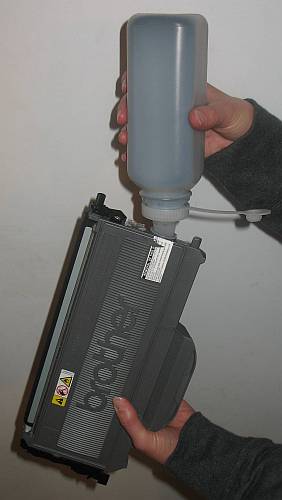
My HP Laserjet 4plus had been a wonderful workhorse, but it began to have feeder roller issues. Instead of spending hundreds to fix an old printer I purchased a new Brother HL-2170W from Costco about 4 months ago. The printer had given me the “toner low” message even though the prints were super sharp. I don’t like it when a printer tells me it is time for a new toner cartridge, but I’ve read that these cartridges actually use toner as a lubricant so running them dry could break things. Anywho… I purchased a toner refill kit on ebay that included two bottles of toner for $16. Instructions said to completely empty out any old toner before adding new toner. What I like about the Brother toner cartridge is that it has a plug that I just pull out to access the tank… no plastic hole cutting / burning! Well, I dumped out the toner… a LOT of toner and then refilled it with the stuff from ebay and replaced the plug. So far I’ve printed at least a thousand pages and things look fantastic!
Update: 9/09:
As I mentioned in the printer forum my inkjet All-In-One died. I decided to buy a laser multipurpose machine to replace it. I opted for the Brother MFC-7440N which is network ready… which also makes my wife happy because she can now print, copy, scan, fax without me having my computer on! This machine takes the exact same laser toner cartridges as the Brother HL-2170W printer: TN330 or “high capacity” TN360 .
Update: 12/10:
I just refilled my Brother laser printer with another toner refill from www.InkOwl.com. I’ve been using them since 2008 and have been very happy with their products, service and prices. They also have some great printer refill videos on YouTube.
I have used remanufactured toner cartridges and also have done many of my own toner refills, here is what I think is true about your experience:
1) Tonerpirate and other rockbottom cost resellers (usually ebay companies) will buy and sell the cheapest toner cartridge they can find. This usually means that the cartridges they sell have not had any of the components changed, only the toner.
2) Cartridgesworld and other refill stores like 123 Refills and Rapid Refills technically and probably do remanufacture the cartridges professionally, removing and replacing worn out parts. This raises the cost significantly, but still much cheaper than originals.
The fact that you had a good experience with tonerpirate i think is quite by accident, i have ordered once from them and got a cartridge that died after about 100 pages. The reason is likely due to the fact that the empties are probably recycled without regard to changing the parts, only the toner. The reason i say this is because i took the cartridge to a professional refiller, and they told me it was the original drum and original blades were still inside, but that the cartridge had been refilled at least 1-2 times before.
I have also refilled many of my own cartridges, when refilling an original, the parts inside are good enough to last another cycle (for the most part), but deteriorate with subsequent refills. So I refill only original cartridges for 1 time, after that i buy from sources that change the parts of the cartridge, like 123 Refills or Cartridge world. Ive had similar quality experiences from both stores, and i would recommend either of them. I found 123 after cartridge world, and 123 was less expensive ($41 for a HP Q2612 which they include 50% more toner than the OEM, compared to $48 from Cartridge World for a model that has the same yield as the original). and their knowledge of the cartridges seems better, but it could be the person behind the store and not so much the chain.
ive also had bad experience with cheap website toners, i bought a refilled brother tn350 from ebay (dirt cheap) and it failed from page 1. ive tried 123refills toner for the same model, it was about 30% more expensive than the ebay one but still much cheaper than buying new one from staples. so far so good! i dont print that much but its looking as good as new.
ive never refilled a cartridge myself, but i think deffinetely theres a big difference if parts are changed vs not changed.
please help me with images how to refill my hp q2612a cartridge.
I am an owner of 4 cartridge world stores in Pennsylvania. We refill toner cartridges for 60% of the cost of a new one in Staples. All vital parts of the cartridge are replaced with new parts that sometimes are better than the original parts. Our toners are reverserd engineered from the original to be close to 99% identical to the original toner. I can only attest to our own stores, as the stores are all private franchises, but we have a return rate of less than 5% of the cartridges ink and laser that we refill / remanufacture. With the right people doing the work, it is very successfull just like any other business.
I tend to agree with you guys that I probably got lucky, but I would be lying if I said I wouldn’t be tempted to go with another low price re-manufacturer again.
Oh, by way of update, my LaserJet 4p has been constantly having printer jams. It was going to cost me about $120 in labor alone to get it worked on. I ended up just buying a Brother HL-2170W that has wired and wireless network support. $99 from Costco… hard to pass up. Biggest problem is that it is such a new printer that the cartridges are really hard to find remanufactured from anyone.
I’ve used RPS Ink and Toners (www.rpsinkandtoners.com) the last two years and have had no problems. He sells the chips to reset the numbers, also.
I’m a tech over at Cartridge World Honolulu, and I can attest to bh’s post from Philedelphia. We do the same stuff here in Honolulu: 60% of Staples cost, Part replacement, specifically formulated toners, less than 5% return rate. That is why Cartridge World Honolulu can offer a 100% guarantee on all the laser (and inkjet) cartridges we make.
Careful with RPS. They are just like them at tonerpirate, etc. You might as weell just buy copy machine toner, because thats what most these ebayers sell but in fancy bottles.
Thank you all so much. I love when I need some advice about a specific subject and I can find a site like this. I am going to try 123 or Cartridge World.
cheers from Pittsburgh
yokaloca
Brother has been using the same toner for years … after cutting the cartridge apart, vacuum out all the old OEM toner and put in the generic … ( the OEM and the Generic do not mix well ) …
I am wondering how many of the Panasonics use the same toner, I have a KX-MB271
Cartridgeworld prices are so high. Quality is ok with inkjet, but I bad experience with a few toners they sell. I heard that their franchise require the store to buy inkjet from them and store owners are reselling toners from some other manufacturer. After reading this article, I bought a few toners tonerpirate.com to use in my office and so far they are working well. Their prices are lowest ever.
Your ghosting is due to a bad drum. The line down the side is due to a bad fuser in the printer. I work for a large printer company.
Catridge World is a franchise. The price comparison I like to draw is with Costco’s original brand and Office Max’ generics. The price difference is negligible to the best. 60% comparing to Staple or other retailer on the original brand price is not a good comparison in my book.
Just another tip: When Refilling use a Vaccum Cleaner to empty the Cartridge. It is a lot less messy than just doing it outside. Make the whole not to close to any gap so that the tape can easily close the whole.
Best solution i have found is to refill myself. Its the cheapest and as long as u use high quality product, you shouldnt see a difference. I buy my refills from Fry’s electronics, they sell the Uni-Kit refill kits there, and they work beautifully on my brother laser. I’ve also seen them online, 123refills carries them and others.
I have Brother MFC 6800 laser printer (Copy/Fax/Scanner) that was working just fine until a few days ago. I installed new toner cartridge (TN250) and cleanned drum unit). I re-installed the drum unit, closed the top cover, turn the power on. The message “CHECK DRUM UNITE” appears in the display window every time I re-install Drum Unit. Please help! What is causing this message?
The Brother printers have replaceable drums. The check drum or replace drum error comes up based on the number of prints you have made. You have to go through a routine to reset the drum counter. Check your manual or download a manual from the Brother website. Has anyone had experience with databazaar toner cartridges? They have great prices. I just received one this week and the packaging looks good – very professional and printer specific. As a CPA in tax season we run through toner like there is no tomorrow so cost effective suppliers are important.
I refuse to give up my HP 4L although it’s, gasp, from 1995. The blacks are so beautiful. I have an inkjet HP that works well but I love my old printer. It’s time for a new cartridge. I see that Xerox has one that’s received positive reviews:
http://www.amazon.com/XEROX-6R899-Toner-cartridge-laserjet/dp/B00001U0RY
The price seems fair. Has anyone here had experience with this item?
I used Cartridge World to replace a toner cartridge (like only 3rd cartridge replacement on a an MFC-8870DW) and the first cartridge one was fine. Cant say how many pages we got off it but no problems. When I was going to go back, girlfriend said see what the larger capacity one costs. I went back to CW and asked about prices on large capacity, but kid just replaced the 550 size and away I went. Returned home, seated in it the relatively new original drum and printer started growling/grinding back at me. I figured this was not a good thing and it was a new behavior not experienced on any of the other replacements. I took out the cartridge, examined it and figured it had to be something with the nylon gears. I could move drum gears a little slugishly, but move them, but cartridge gear seemed pretty tight or bound up. I called them, it was like closing time but they would stay open for an exchange. Off I went to Cartridge World second time in 1/2 hr, they said sometimes gears get put together wrong, not greased, or tightened too much. But that one looked fine, maybe it was my drum. I found out at home the 550 did have a bigger brother, so now talking to manager, I paid another 16 bucks to get the 570. Took it home, replaced cartridge in drum, put drum in printer and still growling/grinding gears. Now they were closed and I was starting to worry my $600 printer was damaged by flakey toner cartridges. Slept on it. Woke up Saturay, afright that the printer had been damaged. Called Cartridge World, new players. Woman said bring in cartridge and drum and we would do some problem determination. I asked ‘should I bring in the printer’? She said no. She had used drums and used cartridges for comparison purposes and my drum behaved like the used ones in terms of sluggish movement and it did look better. Their used cartridges behaved like the drum in terms of gear movement, sluggish but moveable. The replacement they gave me was bound up like the first replacement they gave me. The third replacement (I checked its gears at the store seemed to behalf like the used ones – sluggish but not bound up. Took 3rd replacement home with my drum and a used drum they provided for checking drum, and powered up to finally have a usable device. So 1 of 3 toner cartridge replacements worked, or 2 of 4 if you count the first time I used them. Lots of running around, and the worry I had damaged the drive gear in my printer, have me thinking I should go back to new cartridges, or check the cartridge gear behavior, opening the box at Cartridge World. Any body else experience this problem? Its likely not the gear but something else causing too much friction or drag, however both replacement gears looked browner then the final one.
New news. Returned Drum to Cartridge World and was told they must have forgot to reset the gears on those two…. Explanation I pieced together is the cartridge has brains enough to signal the printer that its low on toner and the brains are tied to the gears somehow. If the gears or something is not reset during the refill procedure, the grinding noise can result, and we waste our time making exchanges. Still on the fence for next replacement, but do have a larger capacity cartridge so maybe I’ll have forgotten about this by then.
i recently changed the drum and toner for my brother 9880 printer .Now the problem is that it prints some parts of the documents but some parts dont come out.When i tried to print the fonts and some printer information it comes out properly but when it comes to photocopying some parts come out properly please help
After using four cartridges for my Brother 5140 and fortunately saving the empty ones, out of curiosity I removed the plug and found each still had about a half of cup of toner remaining in them. I collected all the toner and refilled one cartridge. It has been printing perfectly for 2 weeks now. I will now refill all my cartridges henceforth. I bought some toner and the instructions recommended removing all the old toner before refilling. I’m afraid this is said to sell more toner. I will find out in due time.
Richard, that’s a great point! I’ve got a Brother with the TN360 cartridge and noticed the same thing. Printer said it was empty and refused to print. I removed & shook the cartridge and got a few more prints. When I went to refill it, I did the same thing you did and found a TON of toner still in the cartridge. I read somewhere about modifying the cart so the printer always thought it had toner, so the user could decide when the toner was too light and not the printer.
Keep us posted on your results regarding the “need” to remove all the original toner before refilling. I too question if this is necessary… especially when there is so much original toner still in the carts.
We just purchased 5 MFC7840W brother. Use extreme amount of toner. I wonder if Richard or someone else who has experience refilling the TN360 could give some more info on what refill they using and the process.
An idea:
How about cartridge manufacturers make clear casings for the toner cartridges so we can see how much toner is left inside? Also, we would be able to see what’s happening when we shake the cartridge.
Tom – the TN360 is easy to fill. Just pop the filling cap on the side of the cartridge, and pour in toner. I have used Uni-Kit toner (google it, many resellers) and it works beautifully (around $10 to $15 per refill). They also offer free instructions at http://www.uni-kit.com/support.htm
guys , what about the message that says ” toner empty ” !! it doesnt go even when i refilled my cartridge . the problem is that the printer doesnt print ..
by the way , i’m using xerox pe220 … does anyone knows how to remove this msg and make the printer print again ????
I’ve purchased laser cartridges for my All in One Epson ALCX11, but had a horrible experience. I purchased them thru Cartridge World. They spewed yellow & blue toner through my machine. It cost nearly as much as new to repair. Can the Epson laser cartridges be refilled?
Marly, your HP 4L is only a baby – I bought mine in the Spring of 1992, and it’s a workhorse! Still going strong and making great prints. I hope you refer back to this, since I’m looking for information on that Xerox toner. That’s why I ended up at this page. Anyone have any experience with the XEROX 6R899, or any XEROX replacement toners?
To walter
guys , what about the message that says †toner empty †!! it doesnt go even when i refilled my cartridge . the problem is that the printer doesnt print ..
by the way , i’m using xerox pe220 … does anyone knows how to remove this msg and make the printer print again ????
I had the same issue. The machine counts the amount of pages printed and when it hits that # it tells you “toner empty” even if you have abrand new toner!
The way to reset this is buy replacing a small bus fuse (.o3 amp) on the front of the toner (easily bought in a hardware or electronics store). When the cartridge is put into printer, the fuse ” short circuits” and blows the little fuse which resets the printer. The fuse looks like a small glass tube capped by metal caps about 3/4 of an inch long and sits in a little plastic clip on the front end (the end that goes into the printer first) of the printer.
I hope this helps you!
Moe
I recently bought a Brother HL2140 after having used a large old HP LaserJet 5M for years. I used to go 6 months on a cartridge, now I am lucky to get 2 weeks. I must say I was a bit disturbed when I found out the new low capacity toner carts were $46 at Home Depot (1600 sheets) and the high capacity were $66 (2600 sheets). My cost per page went through the roof with this new printer.
Here’s a novel idea. How about the manufactures quit jacking up the price so high on the these relatively simple hunks of plastic. Sheesh. You’d think they were made of solid gold or something.
…I’m going to join you refillers soon. I can’t afford new ones.
I use an HP Color Laser 2550. Like Richard & Rob above, I too, found almost 1/2 cup of toner in a yellow cartridge that was showing as “empty” in the browser status page. After cleaning it out, I refilled it with toner, replaced the page-count chip and reinstalled it. Now it shows 100% full (due to the page-count chip, not the actual toner content.) There were 2 other cartridges that were showing “low” in the status window. I assumed that they, too, still contained plenty of toner. So I just replaced the page-count chips on them without refilling the toner and now the status page shows them at 100%. I’ll report back when toner runs out or problems arise. But it make a lot of sense to me to just replace the $10 page-count chip and then refill the more expensive toner when it actually runs out. does anyone know if there anything inherently wrong or risky with this approach?
I found a document online for refurbishing toner cartridges (brother actually). The beginning of the document goes into theory about toner and why certain parts should be cleaned etc. This document goes on to say there WILL BE TONER LEFT in the cartridge and that it MUST be cleaned out because it is essentially bad (won’t hold a charge…which of course is necessary to get it onto the drum). If the bad toner gets onto the imaging drum it can damage the print quality of the drum (I think make it print a gray background??). Worse, the bad toner can be transferred from the drum into a perfectly good cartridge rendering it completely damaged if the bad toner mixes with the good. Now, you have to read the whole document to be more convinced…I’m convinced. I have enough technical knowledge (physics degree) to know a convincing argument when I see it. My theory, is it worth losing an imaging drum and potentially a new toner cartridge to save a few dollars (literally) on toner? I don’t think so. For the cost savings of refilling these cartridges yourself compared to purchasing new I think it is a small price to pay. But…to each their own. Here is the link where you can find the document.
http://www.uninetimaging.com/newsletter/Brother_HL_2170W_TN360_Reman_eng.pdf
I have two questions:
Is it possible and/ or worth it to refill toner cartridges for a Lexmark C500N color laser printer?
Are the refurbished cartridges for this printer okay and if so where is a good place to get them.
I tried to have the cartridges refilled at Cartridge World but they, at that time, were not able to refill the Lexmark color laser cartridges.
I used to work for Brother and can tell you that refilling cartridges does work and will save you a boat load of money. They will give you reasons to buy Genuine Toner, but that is bogus as toner is the way they make money on overpriced supplies. Save yourself cash, and go for it. I have a Brother MFC-8860 that I have been refilling for 2 years now, and it works just fine. And Yes So Far, I have spent 36 dollars on toner, having printed over 13000 pages. Refill Starter Cartridges
I have been trying to save by refiling my toner cartridges and have proved unsuccessful. I spent a good chuck of money purchasing Brother DCP-9040CN printer/copier which prints beautifully . I purchased bulk toner for it but cannot reset the gear properly on the TN110 cartridges. I REALLY NEED HELP!!!!! I am convinced that the new printers and copiers are made so that they cannot be reffilled by the average Joe. Will someone please share their smarts with me.
PS I am ressetting the gear exactly the way UNI-KIT says the gear should be set for a Brother TN-110 cartridge.
Brother machines areabout the best most stable option you will find for refilling cartridges because they seperate the toner cartridge from the drum. With Brother, the “toner cartridge” isnt that expensive to begin with….they get you on the drum purchase which you dont have to change that often but watch out when you do.. On top of that when you get the “change drum” message you will find that you likely will have to replace the toner as well, since the toner cartridge dumps all of the toner into the drum when installed. Most other manufacturers sell an all in one solution which includes the toner and drum in one. The drum isnt designed to last as long which is why they are more expensive and less likely to survive a refil. More parts…more to fail. Older HP machines (models with less than a 4 digit model number like HP 4 and 6P as oppossed to HP 4300) are reliable and easy to refill . Other newer machines are far less stable. You will see many franchises say that they have about a 5% return rate but I encourage you to reeally think about the reliability of that number. How many people get a cartridge that failed prematurely or even one that failed right out of the box and simply chalk it up to a lesson learned and never go back to complain or return the failed cartridge. I am one of those people…. I couldnt be bothered to return them. Furthermore if you read the a\bove posts you will read posts from people that had problems with cartridges or inks that they had rectified after going back to the store. Do you think the store clerk accurately recorded this information? Ahhhh I dont think so.
Can you use any laser toner refill for any laser printer? Such as a refill toner black for a brother laser printer, and if you have extra left over to put into your samsung laser printer?
I’ve read mixed reports, but mostly I read that you should NOT mix toner from various printers or even mix a refill with the toner remaining in the cart. In fact, all the refill instructions I’ve seen over the past 4 years say, “Shake out all remaining toner before refilling.” The frugal part of me HATES doing this, but I usually decided not to take my chances and just do as instructed.
It’s 2 years later–Thanks so much for the advise and the following comments–all of you have been a great help. I am off to a refill shop that gives on-line quotes on their refill costs. My first step and I will try filling my own after I see their prices and what they have to say.
Along with a few of you who commented, I agree, printer marketing is parasitic–meaning it is giving little and greedily taking and taking every time you need a refill–very much like the oil industry. Not any different from black mailing you because you need a printer and you need toner. Fair marketing is so out the window. On the bright side we have these wonderful sites to help us out.
Just found this site and have found it quite informative.
I have been considering setting up a refill system in the UK and wonder who you recommend for both machines, consumables, support and any other items related.
Thanks ever so much.
Hi Guy’s!
I’ve got a Kodak 10 printer /scanner works very well but like all of you I find the cost of carts. to high, I’m
looking for a chip to trick the printer, I can find them for lots of units but there do not seem to be any for
Kodak. Any body got any ideas?
Clip clop
i have a three in one brother printer.i refill the toner and when i try to start the printer its shows me drum error clean corona wire,and then i remove the built in drum and start to clean the corona wire several times.when i put it back the built in drum its goes the same?can you help me about this problem.
A few things to note on the above comments and story above….
ALL manufactures set the toner warning to 40% or more when the toner low notice hits. Everybody here that is dumping out the toner that is left in the cartridge just to refill it is wasting money.
ALL toner grinds / melt levels / developer to toner ratio’s are PATENTED by the manufacturer, and anybody that finds the correct formula will be taken to court for patent infringement if they are big enough. This means that the toner you purchase is NEVER 100% correct. i wont get into the details, but the machines that are using a refilled toner cartridge are having thier life expectancy slowly worn away.
It is illegal for a machine manufacturer to state the warranty is void by using reman or refilled toner, but good luck getting them to fix the problem if you inform them you are using a reman or refilled cartridge. For that reason, never throw away the toner that comes with the machine. You can always put it back in before sending it in for repairs.
When your refilled toner breaks, it will definetely cause some MAJOR problems for your machine. Toners are built to over exceed thier life so that when one fails, its not a major problem and doesnt cost the manufacturer a lot of money in warranty claims. When refilling a toner, you never replace the interior parts, and I promise, when the tumbler goes or a gear set locks up you can kiss your printer goodbye.
For every reputable toner dealer there a ten schiesters selling the same product. Purchase refilled or reman toner from only ISO 9001/2000 certified facilities, as they meet all federal guidlines for manufacturing. Even then, it is still a crap shoot as to whether or not your getting a good product.
My name is Joshua Ewart and i have sold toner proffesionally for the past 8 years. i have worked with remaners and resellers alike. I would be happy to hear from any of you that have posted above with questions or concerns. i wont try to sell you, although I do sell a product, but i will be happy to inform you if you like. The company I work for is Fuzzell’s Business quipment in Oklahoma City. We are a family owned and operated business that has been kicking for the past 56 years. my toll free number is 1-800-381-0698. Please feel free to call anytime (ask for Josh) during normal business hours central time.
Hi Josh. Thanks for the offer of help! I believe you about the patenting of toner grinds. The thing is, if my printer life is shortened a bit by using a reman toner, I’ll take that considering the cost of most printers these days is about the same as two sets of factory toner. The printers are practically disposable! By the time I’ve refilled my printer 6 or 7 times with reman toner, I’ve paid for a new printer!
I’ve currently got a KonicaMinolta color multi-function (1690MF). It works OK, but I think I should have stuck with a Canon or a Brother. The FACTORY drum screams like a banshee, especially when printing duplex. This is my second factory drum and both times this has happened. Does anyone know if that’s common or how to stop the noise?
I have used a combination of refilling cartridges and buying refilled cartridges off of eBay. Maybe I’ve just been lucky so far but so far, so good. When I refill I haven’t been dumping the old toner before I refill and I’ve had no real big problems. I think I may have one bad cartridge because I have what seems to be a very light “dusting” of toner across the whole page. Maybe that’s from not dumping old toner. I don’t know. My first problem to overcome with refilling these cartridges is that the plugs are in them real tight! To get them out it’s hard not to mutilate them a bit. Then they don’t seal properly and leak all over the place. I went to a hardware store and found rubber “stopper” plugs that do the job. I just have to be careful not to push them in too hard or they pop completely inside the cartridge and are almost impossible to get out! I’m using LD Products cartridges out of Long Beach off of eBay.
I’m going to give it a try for my Brother TN360 cartridge. How can I not try two refills for $20 as opposed to one cartridge for $51?